

Download WhyNotWin11 – Windows 11 Compatibility Checker, System Requirements Analyzer, PC Upgrade Tool
Overview
WhyNotWin11 is a specialized utility designed to help users determine whether their computer meets the system requirements for installing Windows 11. The application performs a rapid assessment of key hardware and software parameters, providing a clear indication of compatibility without requiring users to manually verify each specification. This tool is particularly useful for individuals considering an upgrade to Windows 11 but uncertain about their system's readiness. By automating the compatibility check, WhyNotWin11 reduces the risk of failed installations and potential system instability.
The target audience includes home users, IT professionals, and system administrators who need a reliable method to evaluate PC readiness before upgrading. The developer, WhyNotWin11, has focused on creating a lightweight, no-frills solution that delivers precise results with minimal user interaction. The application operates independently and does not require installation, making it accessible to users of varying technical skill levels. Real-world use cases include pre-upgrade diagnostics in personal computing environments and quick assessments in small business IT workflows.
Within the broader ecosystem of system utilities, WhyNotWin11 fills a niche by offering a dedicated, focused tool for a specific, high-impact task. Its release on April 15, 2024, aligns with growing user interest in Windows 11 adoption. The developer did not provide additional technical details about the underlying architecture or development methodology. However, the tool’s design emphasizes clarity, speed, and accuracy in delivering compatibility feedback.
Key Features & Functionality
- Instant Compatibility Check – The application performs a real-time evaluation of your PC’s hardware and software configuration to determine if it meets Windows 11’s minimum requirements. This eliminates the need for users to cross-reference documentation or perform manual checks.
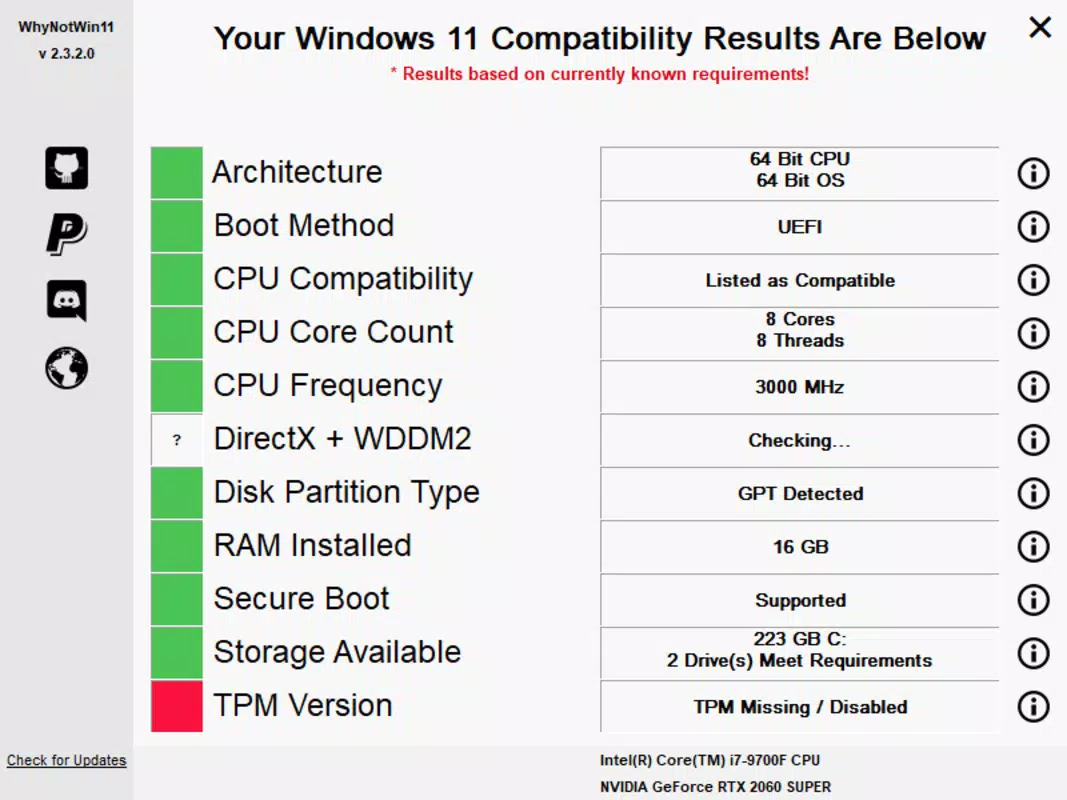
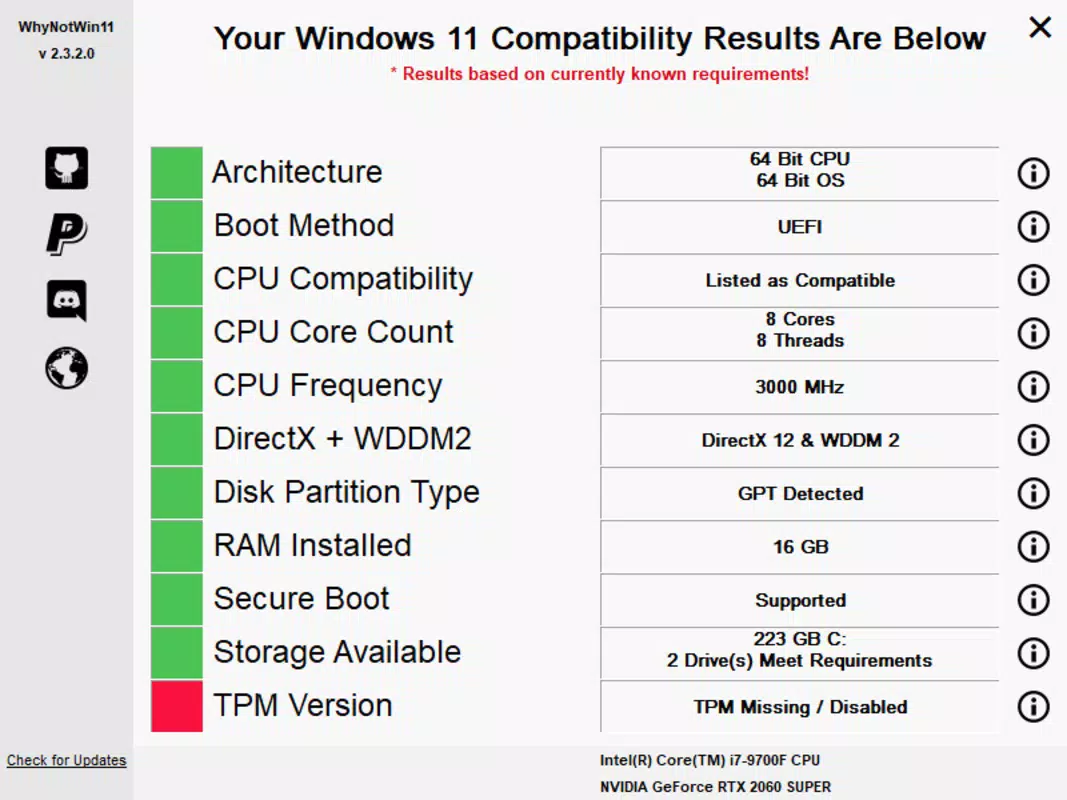
- Comprehensive System Analysis – WhyNotWin11 examines critical parameters including CPU architecture, boot mode, core count, processor frequency, DirectX version, disk partition type, RAM capacity, available storage, and TPM version.
- Red and Green Indicator System – Results are displayed using a visual color-coded system: green indicates compliance, red highlights non-compliance. This intuitive feedback allows users to quickly interpret results without technical expertise.
- Issue Resolution Guidance – When a parameter fails, the tool provides general insights into potential solutions, such as enabling TPM or upgrading RAM, helping users take corrective actions.
- Effortless Operation – The application runs directly from a portable executable. Users simply download, launch, and wait a few seconds for results—no installation or configuration required.
For example, a user with a legacy BIOS system can immediately see that their boot mode is incompatible and take steps to switch to UEFI. Similarly, a user with insufficient RAM can verify the exact amount and decide whether an upgrade is necessary. These real-time insights streamline the decision-making process and reduce the risk of hardware-related installation failures.
Interface, UX & Performance
WhyNotWin11 features a minimalistic, text-based interface that prioritizes functionality over visual design. The layout is straightforward, with system parameters listed in a clean, readable format, each accompanied by a color-coded status indicator. Navigation is direct and intuitive—users launch the program and receive results immediately, with no additional menus or settings.
The application’s performance is optimized for speed and efficiency. Although the developer did not list formal performance metrics, the tool completes its analysis within seconds, even on older hardware. The lightweight footprint of 1.8 MB ensures minimal impact on system resources during execution. Responsiveness is consistent across different device categories, including low-end and mid-range systems.
Stability appears to be a core design goal. The application runs as a single executable without dependencies, reducing the likelihood of crashes or errors. No user reports of instability were provided. The lack of persistent data storage or background processes further enhances reliability. Overall, the user experience is streamlined for a single purpose: delivering fast, accurate compatibility feedback with minimal friction.
Platform Compatibility & Technical Requirements
WhyNotWin11 is designed for the Windows platform and is compatible with all modern Windows operating systems. The application is distributed as a portable executable, meaning it does not require installation and can run directly from a USB drive or local folder. The software version is 1.0.1, released on April 15, 2024, with a file size of 1.8 MB.
The developer did not specify minimum OS requirements or hardware prerequisites beyond the standard Windows environment. However, the tool’s lightweight nature suggests it will function on systems with limited resources. Compatibility information was not fully disclosed, so users should ensure their system supports running .exe files before use. The application is free to download and use, with no in-app purchases or subscription models.
Pros and Cons
Pros
- Lightweight and fast—completes analysis in seconds
- Free to download and use with no hidden costs
- Portable—no installation required, runs from any location
- Clear visual feedback using red/green indicators
- Provides actionable insights for resolving compatibility issues
Cons
- Minimal user interface—lacks advanced customization options
- Developer did not provide detailed technical specifications
- Platform is limited to Windows—no support for macOS or Linux
- Results are binary (compatible/incompatible) without granular diagnostics
- No update notifications or automatic version checks
FAQ
Is WhyNotWin11 safe to download and use?
Yes, the application is distributed as a standalone executable and does not require installation. It does not collect user data or modify system settings. As with any downloaded file, users should ensure it comes from a trusted source.
Can I run WhyNotWin11 on older Windows versions?
The developer did not specify minimum OS requirements. However, the tool’s lightweight design suggests compatibility with Windows 7 and later, provided the system supports running .exe files.
Does WhyNotWin11 require internet access?
No, the application operates offline. All compatibility checks are performed locally using system information, making it suitable for environments with limited or no internet connectivity.
Is WhyNotWin11 available for Mac or Linux?
No, the tool is currently only available for Windows. The developer has not announced plans for cross-platform support.
How often should I run WhyNotWin11?
Users should run the tool whenever considering a Windows 11 upgrade. It is recommended to recheck after hardware changes, such as adding RAM or upgrading the TPM module.
Final Thoughts
WhyNotWin11 delivers a focused, reliable solution for users evaluating their PC’s readiness for Windows 11. Its simplicity, speed, and clear feedback make it an essential tool for anyone planning a system upgrade. While it lacks advanced features or customization, its core purpose is executed with precision and efficiency. The free, portable nature ensures accessibility across a wide range of users, from casual home users to IT professionals managing multiple systems.
For those seeking a no-frills, secure, and fast way to check Windows 11 compatibility, WhyNotWin11 stands out as a practical utility. It removes uncertainty from the upgrade process and empowers users to make informed decisions. With its minimal footprint and straightforward workflow, it represents a smart choice for modern PC maintenance.
Download WhyNotWin11 now


